从哪里开始
SQL是从哪被要求解析的呢?
  //BaseExecutor.java
  @Override
  public <E> List<E> query(MappedStatement ms, Object parameter, RowBounds rowBounds, ResultHandler resultHandler) throws SQLException {
    // <1> 获得 BoundSql 对象
    BoundSql boundSql = ms.getBoundSql(parameter);//↓↓↓↓↓
    // <2> 创建 CacheKey 对象
    CacheKey key = createCacheKey(ms, parameter, rowBounds, boundSql);
    return query(ms, parameter, rowBounds, resultHandler, key, boundSql);
  }
boundSql长啥样?
    /**
    *一次可执行的 SQL 封装
    */
    public class BoundSql {

      /**
       * SQL 语句
       */
      private final String sql;

      /**
       * 参数映射列表,SQL 中的每个 #{xxx} 占位符都会被解析成相
       * 应的 ParameterMapping 对象
       */
      private final List<ParameterMapping> parameterMappings;

      /**
       * 运行时参数,即用户传入的参数,比如 User 对象,或是其他的参数
       */
      private final Object parameterObject;

      /**
       * 附加参数集合,用于存储一些额外的信息,比如 datebaseId
       */
      private final Map<String, Object> additionalParameters;

      /**
       * {@link #additionalParameters} 的 元数据 对象
       */
      private final MetaObject metaParameters;
    }
解析过程
  //MappedStatement.java
  public BoundSql getBoundSql(Object parameterObject) {
    BoundSql boundSql = sqlSource.getBoundSql(parameterObject);//↓↓↓↓↓
    List<ParameterMapping> parameterMappings = boundSql.getParameterMappings();
    if (parameterMappings == null || parameterMappings.isEmpty()) {
      boundSql = new BoundSql(configuration, boundSql.getSql(), parameterMap.getParameterMappings(), parameterObject);
    }

    for (ParameterMapping pm : boundSql.getParameterMappings()) {
      String rmId = pm.getResultMapId();
      if (rmId != null) {
        ResultMap rm = configuration.getResultMap(rmId);
        if (rm != null) {
          hasNestedResultMaps |= rm.hasNestedResultMaps();
        }
      }
    }

    return boundSql;
  }
  //DynamicSqlSource.java
  @Override
  public BoundSql getBoundSql(Object parameterObject) {
    //DynamicContext存有解析后的sql,主要包含appendSql和getSql方法
    DynamicContext context = new DynamicContext(configuration, parameterObject);
    //解析SQL片段,并将解析结果存储到DynamicContext中
    rootSqlNode.apply(context);//↓↓↓↓↓
    SqlSourceBuilder sqlSourceParser = new SqlSourceBuilder(configuration);
    Class<?> parameterType = parameterObject == null ? Object.class : parameterObject.getClass();
    //构建StaticSqlSource,在此过程中sql语句中的占位符#{}会替换为?
    //并为每个占位符构建相应的ParameterMapping
    SqlSource sqlSource = sqlSourceParser.parse(context.getSql(), parameterType, context.getBindings());//↓↓↓↓↓
    //调用StaticSqlSource的getBoundSql获取BoundSql
    BoundSql boundSql = sqlSource.getBoundSql(parameterObject);
    //将DynamicContext的ContextMap(上下文的参数集合)中的内容拷贝到BoundSql中
    context.getBindings().forEach(boundSql::setAdditionalParameter);
    return boundSql;
  }
对于一个包含了${}占位符,或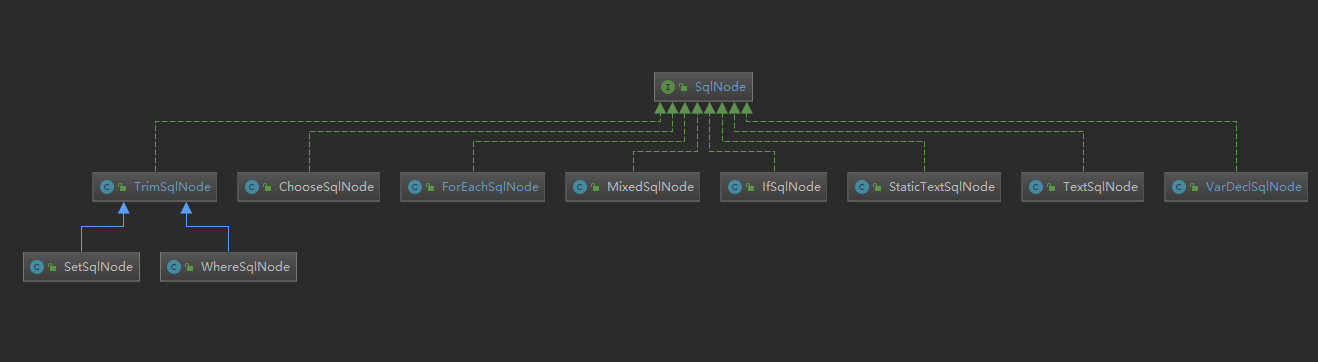
StaticTextSqlNode 用于存储静态文本,TextSqlNode用于存储带有${}占位 符的文本,IfSqlNode 则用于存储
MixedSqlNode
public class MixedSqlNode implements SqlNode {
  private final List<SqlNode> contents;

  public MixedSqlNode(List<SqlNode> contents) {
    this.contents = contents;
  }

  @Override
  public boolean apply(DynamicContext context) {
    //遍历 然后调用SqlNode对象本身的apply方法解析sql
    contents.forEach(node -> node.apply(context));//↓↓↓↓↓
    return true;
  }
}
MixedSqlNode 可以看做是 SqlNode 实现类对象的容器,凡是实现了 SqlNode 接口的类 都可以存储到 MixedSqlNode 中,包括它自己。MixedSqlNode 解析方法 apply 逻辑比较简单, 即遍历 SqlNode 集合,并调用其他 SalNode 实现类对象的 apply 方法解析 sql。
StaticTextSqlNode
//StaticTextSqlNode 用于存储静态文本,所以它不需要什么解析逻辑
//直接将其存储的SQL 片段添加到 DynamicContext 中即可
public class StaticTextSqlNode implements SqlNode {
    private final String text;
    public StaticTextSqlNode(String text) {
        this.text = text;
    }

    @Override
    public boolean apply(DynamicContext context) {
        context.appendSql(text);
        return true;
    }
}
TextSqlNode
public class TextSqlNode implements SqlNode {
  private final String text;
  private final Pattern injectionFilter;

  @Override
  public boolean apply(DynamicContext context) {
    //创建${}占位符解析器
    GenericTokenParser parser = createParser(new BindingTokenParser(context, injectionFilter));
    //解析${}占位符,并将结果添加到DynamicContext
    context.appendSql(parser.parse(text));//↓↓↓↓↓
    return true;
  }

  private GenericTokenParser createParser(TokenHandler handler) {
    //创建占位符解析器,GenericTokenParser是一个通用解析器
    //并非只能解析${}占位符
    return new GenericTokenParser("${", "}", handler);
  }
}
/**
 * GenericTokenParser 是一个通用的标记解析器,用于解析形如${xxx},#{xxx}等标
记 。
*GenericTokenParser 负责将标记中的内容抽取出来,并将标记内容交给相应的
TokenHandler 去处理。
 */
public class GenericTokenParser {

  private final String openToken;
  private final String closeToken;
  private final TokenHandler handler;

  public GenericTokenParser(String openToken, String closeToken, TokenHandler handler) {
    this.openToken = openToken;
    this.closeToken = closeToken;
    this.handler = handler;
  }

  /**
   * 解析以 openToken 开始,以 closeToken 结束的 Token ,并提交给 handler(TokenHandler ) 进行处理
   */
  public String parse(String text) {
    if (text == null || text.isEmpty()) {
      return "";
    }
    // search open token
    // 寻找开始的 openToken 的位置
    int start = text.indexOf(openToken);
    // 找不到,直接返回
    if (start == -1) {
      return text;
    }
    char[] src = text.toCharArray();
    // 起始查找位置
    int offset = 0;
    // 结果
    final StringBuilder builder = new StringBuilder();
    // 匹配到 openToken 和 closeToken 之间的表达式
    StringBuilder expression = null;
    while (start > -1) {
      // 转义字符
      if (start > 0 && src[start - 1] == '\\') {
        // this open token is escaped. remove the backslash and continue.
        // 因为 openToken 前面一个位置是 \ 转义字符,所以忽略 \
        // 添加 [offset, start - offset - 1] 和 openToken 的内容,添加到 builder 中
        builder.append(src, offset, start - offset - 1).append(openToken);
        // 修改 offset
        offset = start + openToken.length();
      } else {
        // found open token. let's search close token.
        if (expression == null) {
          // 创建/重置 expression 对象
          expression = new StringBuilder();
        } else {
          expression.setLength(0);
        }
        builder.append(src, offset, start - offset);
        offset = start + openToken.length();

        // 寻找结束的 closeToken 的位置
        int end = text.indexOf(closeToken, offset);
        while (end > -1) {
          if (end > offset && src[end - 1] == '\\') {
            // this close token is escaped. remove the backslash and continue.
            // 因为 endToken 前面一个位置是 \ 转义字符,所以忽略 \
            // 添加 [offset, end - offset - 1] 和 endToken 的内容,添加到 builder 中
            expression.append(src, offset, end - offset - 1).append(closeToken);
            offset = end + closeToken.length();
            // 继续,寻找结束的 closeToken 的位置
            end = text.indexOf(closeToken, offset);
          } else {
            expression.append(src, offset, end - offset);
            offset = end + closeToken.length();
            break;
          }
        }

        // 拼接内容
        if (end == -1) {
          // closeToken 未找到,直接拼接
          builder.append(src, start, src.length - start);
          // 修改 offset
          offset = src.length;
        } else {
          // closeToken 找到,将 expression 提交给 handler 处理 ,并将处理结果添加到 builder 中
          builder.append(handler.handleToken(expression.toString()));//↓↓↓↓↓
          offset = end + closeToken.length();
        }
      }
      // 继续,寻找开始的 openToken 的位置
      start = text.indexOf(openToken, offset);
    }
    // 拼接剩余的部分
    if (offset < src.length) {
      builder.append(src, offset, src.length - offset);
    }
    return builder.toString();
  }
}
//TextSqlNode内部类
//BindingTokenParser 负责解析标记内容,并将解析结果返回给GenericTokenParser,用于替换${xxx}标记。
private static class BindingTokenParser implements TokenHandler {

    private DynamicContext context;
    private Pattern injectionFilter;

    public BindingTokenParser(DynamicContext context, Pattern injectionFilter) {
      this.context = context;
      this.injectionFilter = injectionFilter;
    }

    @Override
    public String handleToken(String content) {
      Object parameter = context.getBindings().get("_parameter");
      if (parameter == null) {
        context.getBindings().put("value", null);
      } else if (SimpleTypeRegistry.isSimpleType(parameter.getClass())) {
        context.getBindings().put("value", parameter);
      }
      //通过 ONGL 从用户传入的参数中获取结果
      Object value = OgnlCache.getValue(content, context.getBindings());
      String srtValue = value == null ? "" : String.valueOf(value);
      //通过正则表达式检测 srtValue 有效性
      checkInjection(srtValue);
      return srtValue;
    }

    private void checkInjection(String value) {
      if (injectionFilter != null && !injectionFilter.matcher(value).matches()) {
        throw new ScriptingException("Invalid input. Please conform to regex" + injectionFilter.pattern());
      }
    }
}
IfSqlNode
public class IfSqlNode implements SqlNode {
  private final ExpressionEvaluator evaluator;
  private final String test;
  private final SqlNode contents;

  public IfSqlNode(SqlNode contents, String test) {
    this.test = test;
    this.contents = contents;
    this.evaluator = new ExpressionEvaluator();
  }

  @Override
  public boolean apply(DynamicContext context) {
    //通过 OGNL 评估 test 表达式的结果
    //若 test 表达式中的条件成立,则调用其它节点的apply方法进行解析
    if (evaluator.evaluateBoolean(test, context.getBindings())) {
      //是<if>节点中也可嵌套其他的动态节点,并非只有纯文本。
      //因此 contents 变量遍历指向的是 MixedSqlNode,而非 StaticTextSqlNode。
      contents.apply(context);
      return true;
    }
    return false;
  }

}
TrimSqlNode
  //TrimSqlNode.java
  @Override
  public boolean apply(DynamicContext context) {
    // 创建具有过滤功能的 DynamicContext
    FilteredDynamicContext filteredDynamicContext = new FilteredDynamicContext(context);//↓↓↓↓↓
    boolean result = contents.apply(filteredDynamicContext);
    //// 过滤掉前缀和后缀
    filteredDynamicContext.applyAll();
    return result;
  }
private class FilteredDynamicContext extends DynamicContext {
    private DynamicContext delegate;
    private boolean prefixApplied;
    private boolean suffixApplied;
    private StringBuilder sqlBuffer;

    public FilteredDynamicContext(DynamicContext delegate) {
      super(configuration, null);
      this.delegate = delegate;
      this.prefixApplied = false;
      this.suffixApplied = false;
      this.sqlBuffer = new StringBuilder();
    }

    public void applyAll() {
      sqlBuffer = new StringBuilder(sqlBuffer.toString().trim());
      String trimmedUppercaseSql = sqlBuffer.toString().toUpperCase(Locale.ENGLISH);
      if (trimmedUppercaseSql.length() > 0) {
        // 对 sql 进行过滤操作,移除掉前缀或后缀
        applyPrefix(sqlBuffer, trimmedUppercaseSql);
        applySuffix(sqlBuffer, trimmedUppercaseSql);
      }
      // 将当前对象的 sqlBuffer 内容添加到代理类中
      delegate.appendSql(sqlBuffer.toString());
    }

    private void applyPrefix(StringBuilder sql, String trimmedUppercaseSql) {
      if (!prefixApplied) {
        // 设置 prefixApplied 为 true,以下逻辑仅会被执行一次
        prefixApplied = true;
        if (prefixesToOverride != null) {
          for (String toRemove : prefixesToOverride) {
            // 检测当前 sql 字符串是否包含前缀,比如 'AND ', 'AND\t'等
            if (trimmedUppercaseSql.startsWith(toRemove)) {
              sql.delete(0, toRemove.trim().length());
              break;
            }
          }
        }
        // 插入前缀,比如 WHERE
        if (prefix != null) {
          sql.insert(0, " ");
          sql.insert(0, prefix);
        }
      }
    }

    private void applySuffix(StringBuilder sql, String trimmedUppercaseSql) {
      if (!suffixApplied) {
        suffixApplied = true;
        if (suffixesToOverride != null) {
          for (String toRemove : suffixesToOverride) {
            if (trimmedUppercaseSql.endsWith(toRemove) || trimmedUppercaseSql.endsWith(toRemove.trim())) {
              int start = sql.length() - toRemove.trim().length();
              int end = sql.length();
              sql.delete(start, end);
              break;
            }
          }
        }
        if (suffix != null) {
          sql.append(" ");
          sql.append(suffix);
        }
      }
    }
}
WhereSqlNode
//基于 TrimSqlNode 实现
public class WhereSqlNode extends TrimSqlNode {

  private static List<String> prefixList = Arrays.asList("AND ","OR ","AND\n", "OR\n", "AND\r", "OR\r", "AND\t", "OR\t");

  public WhereSqlNode(Configuration configuration, SqlNode contents) {
    super(configuration, contents, "WHERE", prefixList, null, null);
  }

}
SetSqlNode
//同上
public class SetSqlNode extends TrimSqlNode {

  private static final List<String> COMMA = Collections.singletonList(",");

  public SetSqlNode(Configuration configuration,SqlNode contents) {
    super(configuration, contents, "SET", COMMA, null, COMMA);
  }

}
经过前面的解析,我们已经能从 DynamicContext 获取到完整的 SQL 语句了。但这并不 意味着解析过程就结束了,因为当前的 SQL 语句中还有一种占位符没有处理,即#{}。与${} 占位符的处理方式不同,MyBatis 并不会直接将#{}占位符替换为相应的参数值。
//构建StaticSqlSource,在此过程中sql语句中的占位符#{}会替换为?
//并为每个占位符构建相应的ParameterMapping
SqlSource sqlSource = sqlSourceParser.parse(context.getSql(), parameterType, context.getBindings());
接着这一句往下分析
  //SqlSourceBuilder.java
  public SqlSource parse(String originalSql, Class<?> parameterType, Map<String, Object> additionalParameters) {
    // 创建 #{} 占位符处理器
    ParameterMappingTokenHandler handler = new ParameterMappingTokenHandler(configuration, parameterType, additionalParameters);
    // 创建 #{} 占位符解析器
    GenericTokenParser parser = new GenericTokenParser("#{", "}", handler);
    // 解析 #{} 占位符,并返回解析结果,源码上面分析过了
    String sql = parser.parse(originalSql);
    // 封装解析结果到 StaticSqlSource 中,并返回
    return new StaticSqlSource(configuration, sql, handler.getParameterMappings());
  }
GenericTokenParser 负责将#{}占位符中的内容抽取出来,并将抽取出的内容传给 handleToken 方法。handleToken 方法负责将传入的参数解析成对应的 ParameterMapping 对象,这步操作由 ParameterMappingTokenHandler方法完成。
//SqlSourceBuilder内部类
private static class ParameterMappingTokenHandler extends BaseBuilder implements TokenHandler {

    private List<ParameterMapping> parameterMappings = new ArrayList<>();
    private Class<?> parameterType;
    private MetaObject metaParameters;

    public ParameterMappingTokenHandler(Configuration configuration, Class<?> parameterType, Map<String, Object> additionalParameters) {
      super(configuration);
      this.parameterType = parameterType;
      this.metaParameters = configuration.newMetaObject(additionalParameters);
    }

    public List<ParameterMapping> getParameterMappings() {
      return parameterMappings;
    }

    @Override
    public String handleToken(String content) {
      //parameterMappings为SqlSourceBuilder的成员变量,构造返回的StaticSqlSource用
      parameterMappings.add(buildParameterMapping(content));
      //就直接返回个?
      return "?";
    }

    private ParameterMapping buildParameterMapping(String content) {
      Map<String, String> propertiesMap = parseParameterMapping(content);
      String property = propertiesMap.get("property");
      Class<?> propertyType;
      if (metaParameters.hasGetter(property)) {
        propertyType = metaParameters.getGetterType(property);
      } else if (typeHandlerRegistry.hasTypeHandler(parameterType)) {
        propertyType = parameterType;
      } else if (JdbcType.CURSOR.name().equals(propertiesMap.get("jdbcType"))) {
        propertyType = java.sql.ResultSet.class;
      } else if (property == null || Map.class.isAssignableFrom(parameterType)) {
        propertyType = Object.class;
      } else {
        MetaClass metaClass = MetaClass.forClass(parameterType, configuration.getReflectorFactory());
        if (metaClass.hasGetter(property)) {
          propertyType = metaClass.getGetterType(property);
        } else {
          propertyType = Object.class;
        }
      }
      ParameterMapping.Builder builder = new ParameterMapping.Builder(configuration, property, propertyType);
      Class<?> javaType = propertyType;
      String typeHandlerAlias = null;
      for (Map.Entry<String, String> entry : propertiesMap.entrySet()) {
        String name = entry.getKey();
        String value = entry.getValue();
        if ("javaType".equals(name)) {
          javaType = resolveClass(value);
          builder.javaType(javaType);
        } else if ("jdbcType".equals(name)) {
          builder.jdbcType(resolveJdbcType(value));
        } else if ("mode".equals(name)) {
          builder.mode(resolveParameterMode(value));
        } else if ("numericScale".equals(name)) {
          builder.numericScale(Integer.valueOf(value));
        } else if ("resultMap".equals(name)) {
          builder.resultMapId(value);
        } else if ("typeHandler".equals(name)) {
          typeHandlerAlias = value;
        } else if ("jdbcTypeName".equals(name)) {
          builder.jdbcTypeName(value);
        } else if ("property".equals(name)) {
          // Do Nothing
        } else if ("expression".equals(name)) {
          throw new BuilderException("Expression based parameters are not supported yet");
        } else {
          throw new BuilderException("An invalid property '" + name + "' was found in mapping #{" + content + "}.  Valid properties are " + PARAMETER_PROPERTIES);
        }
      }
      if (typeHandlerAlias != null) {
        builder.typeHandler(resolveTypeHandler(javaType, typeHandlerAlias));
      }
      return builder.build();
    }

    private Map<String, String> parseParameterMapping(String content) {
      try {
        return new ParameterExpression(content);
      } catch (BuilderException ex) {
        throw ex;
      } catch (Exception ex) {
        throw new BuilderException("Parsing error was found in mapping #{" + content + "}.  Check syntax #{property|(expression), var1=value1, var2=value2, ...} ", ex);
      }
    }
  }
接着主线往下走,别岔咯
 //调用StaticSqlSource的getBoundSql获取BoundSql
 BoundSql boundSql = sqlSource.getBoundSql(parameterObject);
public class StaticSqlSource implements SqlSource {

  private final String sql;
  private final List<ParameterMapping> parameterMappings;
  private final Configuration configuration;

  public StaticSqlSource(Configuration configuration, String sql) {
    this(configuration, sql, null);
  }

  public StaticSqlSource(Configuration configuration, String sql, List<ParameterMapping> parameterMappings) {
    this.sql = sql;
    this.parameterMappings = parameterMappings;
    this.configuration = configuration;
  }

  @Override
  public BoundSql getBoundSql(Object parameterObject) {
    return new BoundSql(configuration, sql, parameterMappings, parameterObject);
  }

}
很简单,没什么好说的
然后就没有然后了
至此SQL解析完毕